

Instant features
(Experimental) Next.js SSR
If you use Next.js and want to do server-side rendering, we have an experimental library for you.
@instantdb/react/nextjs can let you run Instant queries both on the server and the client, and for the first time, share caches between them. (If you don’t get what this means yet, no worries, we’ll explain in detail in the document! Suffice it to say it’s pretty cool.)
This is an experimental feature, and you may not need SSR for many applications. But when you do, you can get some exceptional UX from it.
In this essay we’ll cover:
- What server-side rendering is
- When SSR is a good idea
- How Instant works over SSR, particularly on caches
- And how to add SSR in your projects
#What is server-side rendering?
Server-side rendering lets you run your JavaScript code in two environments.
First, the server renders your React component. So as soon as a browser sees your website, your React component is there.
Once the browser loads JavaScript, the same component runs on the client once more. This way, if you have hover effects or other logic that needs to attach to your component, it can do that in the browser.
To get a sense for how this all works, imagine loading a todo app:
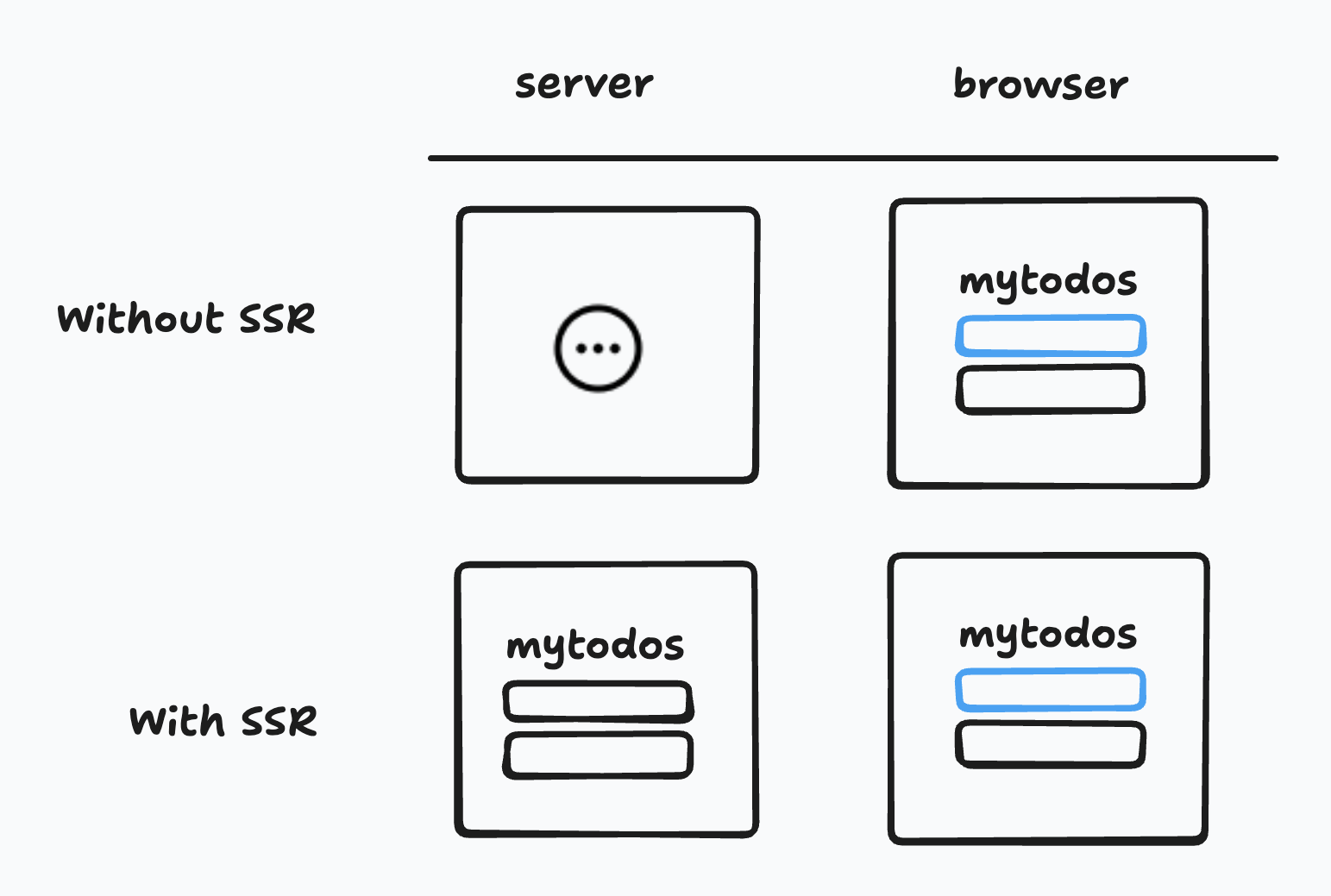
Without SSR, when you first loaded the site, you’d see a blank page. Once JavaScript loaded, React would kick in and you’d see your todos show up.
With SSR, your todo component would render on the server first. The very first load in the browser would already show todos. Once JavaScript loaded, the todo component would reattach and all the click handlers and effects would work.
#When is server-side rendering a good idea?
At first glance, server-side rendering can sound great. Why not run your code right away on the server? Well, there are two costs:
#The costs
The biggest cost is complexity: Your code runs in two environments. Once on the server, and once on the client. Next.js and Instant can do a good job of hiding the difference, but sometimes those differences leak out (as a basic example, there’s no window on the server). For many applications, you may not want the added complexity.
The second cost relates to client-heavy applications: If you want your application to feel like a desktop app, you’ll want to reduce the number of times your application pauses while navigating. This means that you have to be proactive with fallback states when using <Suspense />, or prefetch anticipated queries more aggressively.
Tip: You can prefetch queries by db.queryOnce() from anywhere, or by using db.useQuery() in a component and ignoring the result.
#The Benefits
But there are also some clear benefits.
SSR can be great for search engines. Web crawlers are getting better with JavaScript, but they generally do the best job at indexing websites when the content is there on the first load. SSR can do this for you.
SSR can remove loading screens, especially if you use Next.js Routes. Sometimes you load an app and see lots of loading spinners. SSR can help you remove those spinners. Since there’s content on the first load, you can often ignore loading states completely. You may wonder, won’t the first load be slower if you’re fetching data? Not by much, for two reasons. First, if you use Next.js routing, it will try to pre-fetch as much as possible. By the time a user clicks a link, the data is often already there. Second, if you use Vercel, their servers are close to Instant servers, which means queries often take milliseconds to transfer.
Put these benefits together, and sometimes SSR really is worth it.
#How Instant works with SSR
So, if the benefits are worth it for you, how can you use Instant with SSR? That’s where @instantdb/react/nextjs comes in.
With @instantdb/react/nextjs you get a special package with a new hook: db.useSuspenseQuery:
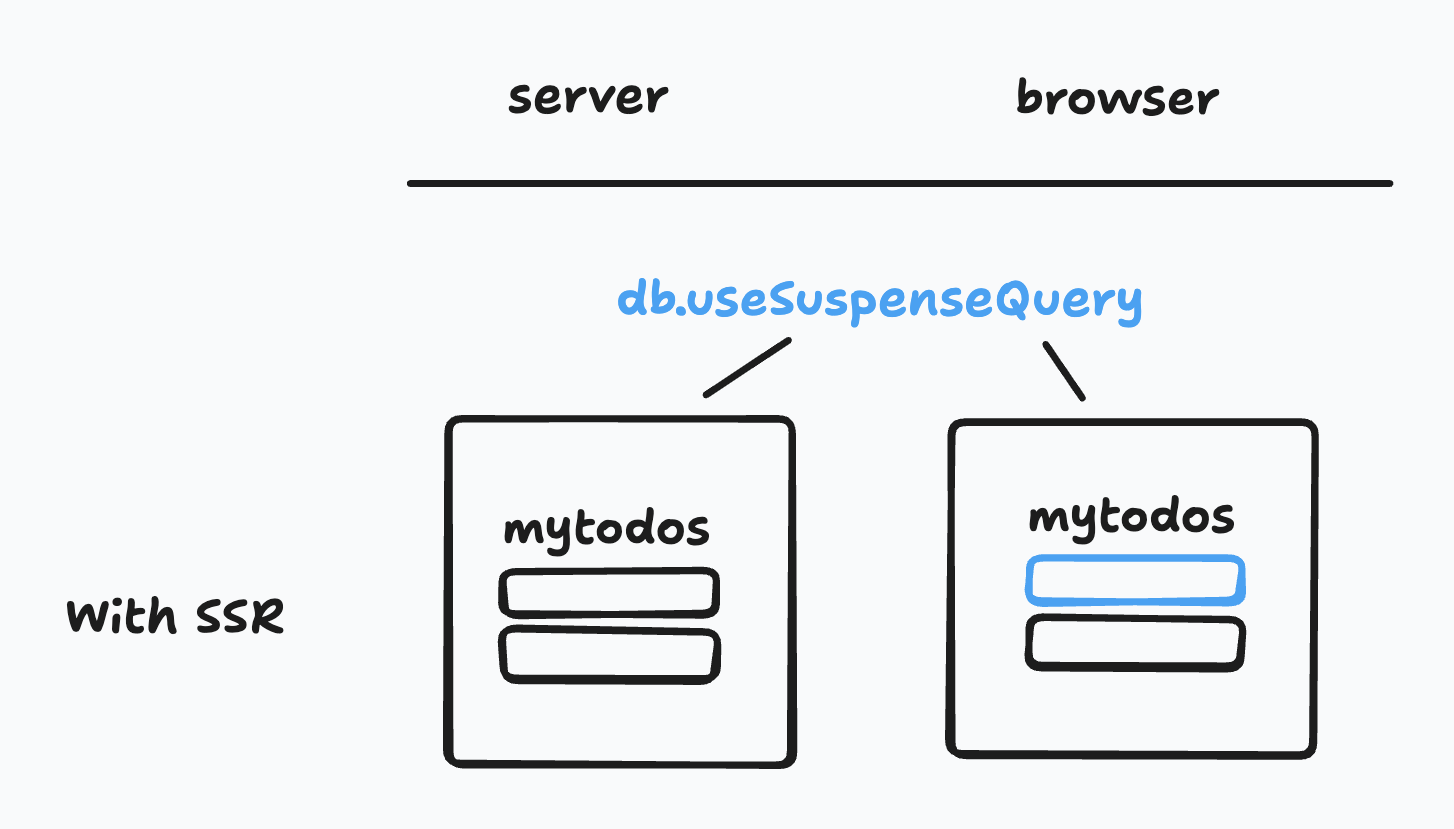
When you use db.useSuspenseQuery, (1) it will run a query once and get data on the server. When loaded in the browser, (2) it will reconnect and subscribe to changes on the same query. This means on the first load you have data, and it becomes real-time in the browser.
#What about offline caches?
There's nothing faster than local data. If useSuspenseQuery is running on the client, it will use the local data and websocket connection instead.
In addition, when the page first loads from SSR, it will update the local cache with the most up-to-date results.
Using SSR can make data fetching slower in one specific case: If you are using useSuspenseQuery and there is not a <Suspense> anywhere higher in the component tree, the server will not send any HTML/JS at all until the query has resolved and the page has rendered. In some cases, this is desirable for things like SEO, but if the user already has the query result in their local cache, the page load is blocked, and they won't get a chance to load it and will have to wait.
If the component that calls useSuspenseQuery is wrapped in a <Suspense/>, then the data will be fetched at the same time on both the client and server, and the user will see whichever result loads fastest. For returning users, this usually ends up being the local data, but for non-cached queries, the server is often faster.
#Adding SSR to your projects
If this all sounds good to you, you can add SSR to your projects today.
Here’s the step-by-step guide.
#1. Replace your db client
First things first, we’ll want to replace our db client to work with SSR.
Instead of importing from @instantdb/react, you’ll import from @instantdb/react/nextjs:
// src/lib/db.tsimport { init } from '@instantdb/react/nextjs';import schema from '../instant.schema';export const db = init({appId: process.env.NEXT_PUBLIC_INSTANT_APP_ID!,schema,firstPartyPath: '/api/instant',});
Note that we also included firstPartyPath. This lets us sync auth between client and server.
#2. Sync auth
Syncing auth is covered in more detail here, but we'll reproduce the main steps to make this tutorial easy to follow.
Let's create a route handler under app/api/instant/route.ts:
// src/app/api/instant/route.tsimport { createInstantRouteHandler } from '@instantdb/react/nextjs';export const { POST } = createInstantRouteHandler({appId: process.env.NEXT_PUBLIC_INSTANT_APP_ID!,});
Once we do this, Instant can start to detect the logged-in user both in the browser and on the server.
#3. Create an InstantProvider
SSR relies on suspense. To support that we’ll need to make an InstantProvider component:
// src/InstantProvider.tsx"use client";import { db } from "@/app/lib/db";import { type User } from "@instantdb/react";import { InstantSuspenseProvider } from "@instantdb/react/nextjs";import React from "react";export const InstantProvider = ({children,user,}: {children: React.ReactNode;user: User;}) => (<InstantSuspenseProvider user={user} db={db}>{children}</InstantSuspenseProvider>);
#4. Update layout.tsx
Now we’ll want to use our InstantProvider in a server component, usually app/layout.tsx:
// src/app/layout.tsximport { getUnverifiedUserFromInstantCookie } from "@instantdb/react/nextjs";import { InstantProvider } from "@/InstantProvider";export default async function RootLayout({ children }) {const user = await getUnverifiedUserFromInstantCookie(process.env.NEXT_PUBLIC_INSTANT_APP_ID!);return (<html><body><InstantProvider user={user}>{children}</InstantProvider></body></html>);}
If using the Next.js pages directory, you can use getServerSideProps to get the user and pass it to the provider via the PageProps.
This (a) fetches the current user, and (b) puts the Instant provider in the React tree.
At this point...we’re ready to use SSR queries!
#5. db.useSuspenseQuery to your heart's delight
Now that you’ve set up SSR, you should see a new db.useSuspenseQuery available. Use it in your pages:
'use client';import { db } from '@/lib/db';export default function Page() {// renders on server, no loading state neededconst { data } = db.useSuspenseQuery({ posts: {} });}
Note how there’s no isLoading or error state from db.useSuspenseQuery! This is handled using React Suspense, which makes sure we have the data when we render this page.
If your code uses useUser, useAuth, or db.SignedIn/db.SignedOut, it will initially use the user value you provided to InstantProvider instead of a pending state. These hooks/components will continue to be reactive.
#Questions
This is still a beta. We'd love to hear your feedback on Discord!