

After 4 years, we’re releasing Instant 1.0!
Instant turns your favorite coding agent into a full-stack app builder. And we’re fully open source. [1]
Our claim is that Instant is the best backend you could use for AI-coded apps.
In this post we’ll do two things. First we’ll show you a series of demos, so you can judge for yourself. Second, we’ll cover the architecture.
The constraints behind a real-time, relational, and multi-tenant backend pushed us towards some interesting design choices. We built a multi-tenant database on top of Postgres, and a sync engine in Clojure. We’ll cover how all this works and what we’ve learned so far.
Let’s get into it.
Demos
When you choose Instant you get three benefits:
- You can make unlimited apps and they’re never frozen.
- You get a sync engine, so your apps work offline, are real-time, and feel fast.
- And when you need more features you have built-in services: auth, file storage, presence, and streams.
To get a sense of what we mean, I’ll dive into each point and show you how they look.
Unlimited Apps
Traditionally, when you want to host apps online you either pay for VMs, or you’re limited. Many services cap how many free apps you can make, and freeze them when they’re idle. Unfreezing can often take more than 30 seconds and sometimes a few whole minutes.
We thought this sucked. So with Instant, you can spin up as many projects as you like and we’ll never freeze them.
We can do this because Instant is designed to be multi-tenant. When you create a new project, we don’t spin up a VM. We just insert a few database rows in a multi-tenant instance.
If your app is inactive, there are no compute or memory costs at all. And when it is active, it’s only a few kilobytes of extra RAM in overhead — as opposed to the many hundreds of megabytes required for VMs.
This means you can truly create unlimited apps. In fact, the process is so efficient that we can create an app for you right inside this essay. No sign up required.
If you click the button, you’ll get an isolated backend:
And with that we have our backend. Including the round-trip to your computer, the whole process takes a few hundred milliseconds. Actual time:
You get a public App ID to identify your backend, and a private Admin Token that lets you make privileged changes. This gives you a relational database, sync engine, and the additional services we mentioned, like auth and storage.
Combine limitless apps with agents, and you’ll start building differently. Today you can already use agents to make lots of apps. With Instant you’ll never be blocked from pushing them to production.
Sync Engine
But once you create an app, how do you make it good?
It’s easy to build a traditional CRUD app. Just get an agent to wire up some database migrations, backend endpoints, and client-side stores. But it’s hard to make these apps delightful.
Compare a traditional CRUD app to modern apps like Linear, Notion, and Figma. Modern apps are multiplayer, they work offline, and they feel fast. If you change a todo in Linear, it changes everywhere. If you go offline in Notion, you can still mark up your docs. When you color a shape in Figma, it doesn’t wait for a server, you just see it.
These kinds of apps need custom infrastructure. For real-time you add stateful websocket servers. For offline mode you store caches in IndexedDB. And for optimistic updates, you figure out how to apply and undo mutations in the client.
Linear, Notion, and Figma all built custom infra to handle this. As an industry we’ve called their infra sync engines [2]. Developers write UIs and query their data as though it was locally available. The sync engine handles all the data management under the hood.
If modern apps need sync engines, then you shouldn’t have to build them from scratch each time.
So we built a generalized sync engine in Instant. Every app comes with multiplayer, offline mode, and optimistic updates by default.
You can try it yourself. Since we’ve created our isolated backend, let’s go ahead and use it:
Spin up a backend to try the live demo.
What you’re seeing are two iframes that render a todo app. They’re powered by the backend you just created (we passed the iframes your App ID).
Now if you add a todo in one iframe, it will show up in the other. If you go offline, you can make changes and they will sync together. You can try degrading your network, and changes will still feel fast.
And here’s what the todo app’s backend code is like:
App.tsx
import { init, id } from '@instantdb/react';

const db = init({ appId: 'YOUR_APP_ID' });

function App() {
  const { data } = db.useQuery({ todos: {} });

  const addTodo = (text) =>
    db.transact(
      db.tx.todos[id()].update({ text, done: false }),
    );

  const toggleTodo = (todo) =>
    db.transact(
      db.tx.todos[todo.id].update({ done: !todo.done }),
    );

  return (
    <TodoUI
      todos={data?.todos ?? []}
      onAdd={addTodo}
      onToggle={toggleTodo}
    />
  );
}
That’s about 25 lines. This is even more concise than if you had built a traditional CRUD app. You would have needed to write backend endpoints and frontend stores. Instead you just make queries and transactions directly in your frontend.
db.useQuery lets you write relational queries and they stay in sync. db.transact lets you make changes and it works offline.This is better for you as a builder: the code is understandable and it’s easy to maintain. It’s better for your users: they get a delightful app. And it’s better for your agents. Sync engines are a tight abstraction [3], so agents can use them to write more concise code with fewer tokens and fewer mistakes.
Additional Services
You saw data sync, but it doesn’t stop there. Apps often need more than data sync.
For example, right now every person who opens our demo app sees the same set of todos. What if we want to add auth or permissions? We may also want to support file uploads, or a “who’s online” section. Or heck maybe we add an AI assistant, and would need infra to stream tokens to the client.
These are common features that most apps need. But often we have to string together different services to get them. Not only is that annoying, but it introduces a new level of complexity. When you manage multiple services, you manage multiple sources of truth.
So to make it easier to enhance your apps, we baked in a bunch of common services inside Instant. Each service is built to work together as a single, integrated system.
To get a sense of these services, let’s look at our todo app again, but this time we’ll add support for file uploads:
Spin up a backend to try the file upload demo.
What would be the traditional way to do this? We would first create a
files table in our transactional database, and link it to todos. But then we would need to store the actual file blobs, so we’d probably add S3.Once we add S3, we have multiple sources of truth to deal with. If we delete a todo for example, we’d need to run a background worker to get rid of the corresponding blob in S3.
With Instant, all of this is a non-issue.
You get File Storage by default, and file objects are just rows in your database. They’re just like any other entity: you can create them, link them to other data, and run real-time queries against them.
This means you can even create CASCADE delete rules, so you can say “when you delete todos, delete files”. There’s no need for background workers. Instead of multiple sources of truth, you get one integrated database. The shared infra handles all the edge cases under the hood [4].
And this is just Instant Storage. You also get Auth. You can use Magic Codes, OAuth, and Guest Auth out of the box. Plus when your users sign up, they’re just rows in your database too.
If you want to share cursors, typing indicators, or ‘who’s online’ markers, you can use Instant Presence.
And if you need to share durable streams, you get, well, Instant Streams.
If you’re curious, we have a bunch of real examples you can play with in the recipes page. You’ll notice that most of these services require little setup and little code. Both you and your agents can move faster and make your apps feature-rich. You don’t have to scour for different providers and deal with bi-directional data sync.
Bonus: What you can do, your agent can do
Throughout this essay, you may have wondered, how do all these demos work?
Well, Instant is completely programmatic. You can create apps, push schemas and update permissions either through an API or a CLI. This essay uses the API, but likely your agents will use the CLI.
Most of the time you don’t have to click any dashboards. Your agents can just take actions on your behalf.
At this point, we hope you’re excited enough to sign up.
You technically don’t even need to sign up to play around, but we do notice that if you do, you’re more likely to stick around. So we really encourage you to!
And if you want to get your agents playing with Instant right away, here are a few things you can do:
# This scaffolds a new starter for you in either NextJS, Tanstack, Bun, Vite, or Expo
# Your agent will have everything it needs to build
npx create-instant-app

# If you have an existing app, you can also add our handy skill and tell your agent
# to make some new features
npx skills add instantdb/skills
And with that, we can dive into the architecture that powers all of this.
Architecture
There are three unique things about how Instant works. We have the Client SDK, the Clojure Backend, and the Multi-Tenant Database.
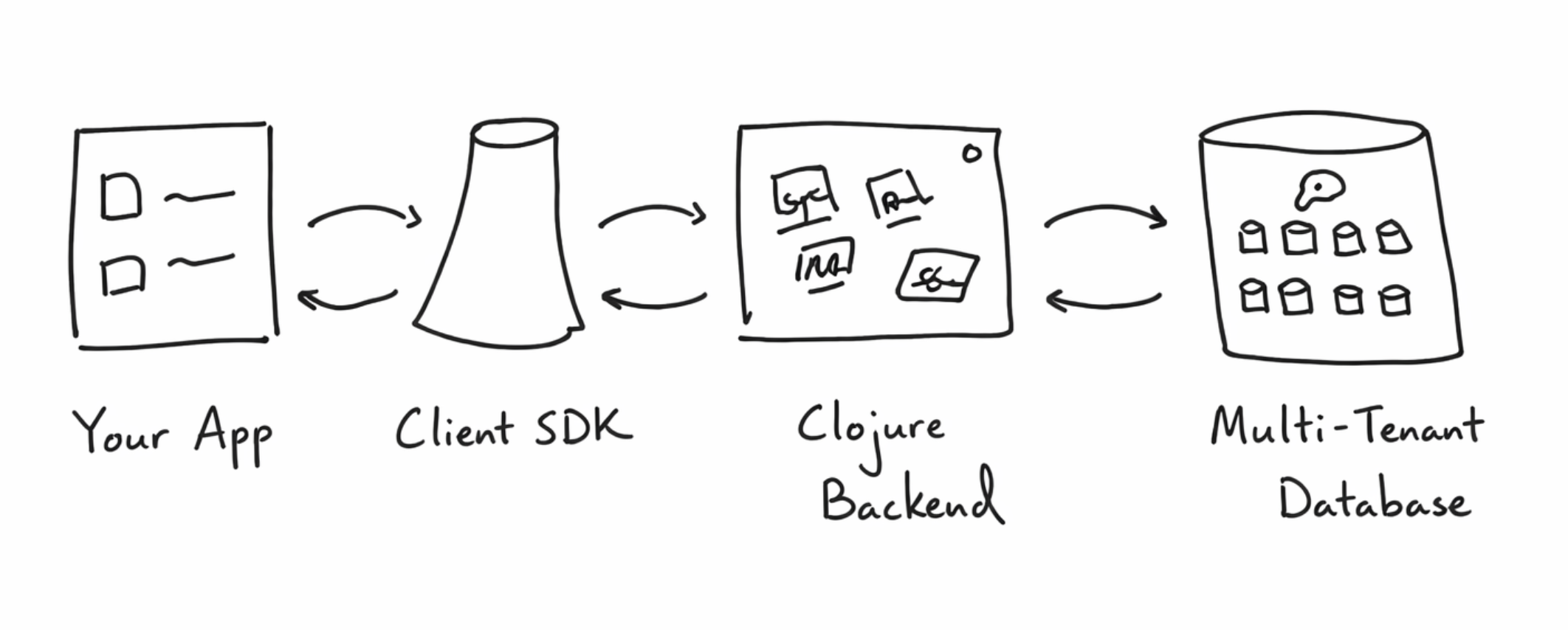
Your app sends queries and transactions directly to the Client SDK. It’s responsible for resolving your queries offline, and for applying transactions as soon as you make them.
The Client SDK then talks to The Clojure Backend. The Clojure Backend keeps queries real-time. It takes transactions and figures out which clients need to know about them. It also implements all the additional services: permissions, auth, presence, storage, and streams.
Finally, The Clojure Backend sends queries and transactions to a single Postgres Instance. We treat Postgres as a multi-tenant Triple store, and logically separate every database by App ID.
That’s the sketch of our system. Now let’s get deeper.
The Client SDK
The design behind the Client SDK is motivated by two constraints: we need a system that works offline, and we need it to support optimistic updates.
Here’s roughly where we ended up:
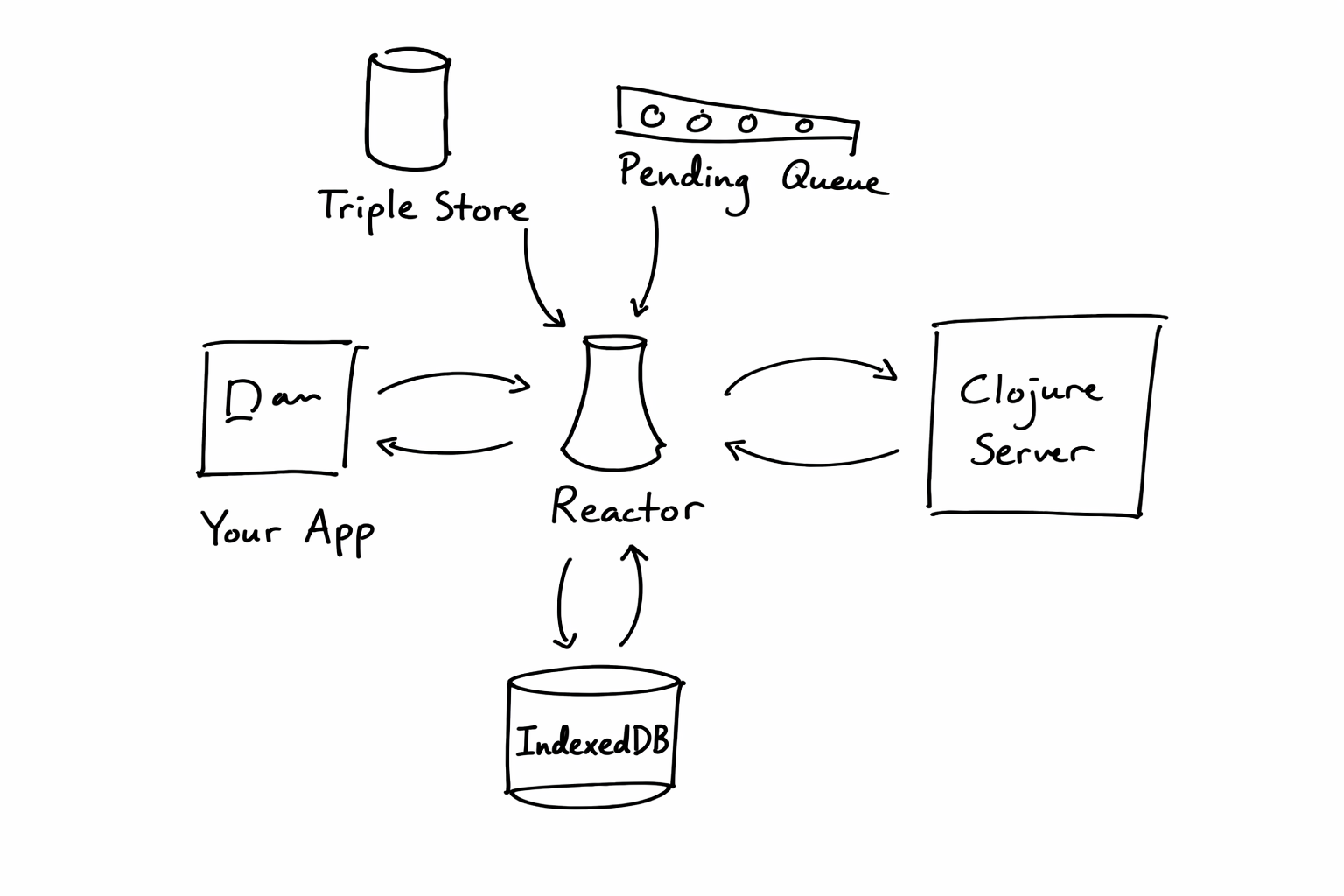
IndexedDB
Let’s start with the most obvious box. If we want to show the app offline, we need a place for data to live across refreshes.
For the web you don’t have too many choices. IndexedDB is the best candidate. You can store many megabytes of data, and you even have some limited querying capabilities.
So we chose IndexedDB [5]. The next question was, what kind of data would we store there?
Triple store
Consider a query like “Show me all the open todos and their attachments”. This is how you would write it in Instant:
{
  todos: {
    $: { where: { done: false } },
    attachments: { },
  },
}
If we just wanted a read-only cache, we could store whatever the server returns to us. But we don’t just want a read-only cache.
We need the client to respond to actions before the server acknowledges them. If a user adds a new todo for example, our query should just update right away.
That means the client needs to understand queries. So then what our client really needs is a database itself. A database that can handle where clauses (i.e., ‘done is false’), and relations (‘todos and their attachments’).
One option would have been to use SQLite. We could store normalized tables there — like
todos, and files — and run SQL over them. But this was too heavy. SQLite is about 300 KB gzipped. For most apps it wouldn’t make sense to add such a heavy dependency.After some sleuthing though we discovered Triple stores and Datalog.
Triple stores let you store data as
[entity, attribute, value] tuples. Here’s what todos would look like inside a Triple store:Team Tasks / #42
Ship!
Triple Store
entity
attribute
value
task_1
title
Ship!
task_1
done
true
task_1
owner
daniel_1
daniel_1
avatar
daniel.png
joe_1
avatar
joe.jpg
This uniform structure can model both attributes and relationships. Once data is stored in this way, you can use Datalog to make queries against it.
Datalog is a logic-based query engine. Here’s what that looks like:
InstaQL
{ todos: { $: { where: { done: } } } }
Datalog
[?todo"done"]
[?todo?attr?val]
Triple Store
entity
attribute
value
todo_1
title
Ship!
todo_1
done
true
todo_2
title
Fix bug
todo_2
done
false
The syntax looks weird, but Datalog is powerful. It can support where clauses and relations just as well as SQL. And it’s simple to implement. In fact, you can write a basic Datalog engine in less than a hundred lines of code [6].
So we built a Triple store and a Datalog engine. This lets us evaluate queries completely in the client, without having to wait for the server.
If a user creates a new todo, we have what we need to re-run the query and observe the change right away. Well, almost. We need a way to apply changes to our query.
Pending Queue
We can’t just mutate the result in place. We have to be mindful of the server too.
For example, what would happen if the server rejects our transaction? If we mutated the query result, there would be no way for us to undo the change. [7]
That’s where the Pending Queue comes in. When a user makes a change, we don’t apply it directly to the Triple store. Instead we track the change in a separate queue.
To satisfy any query, we can apply pending changes to our triple store, and see the result:
Triple Store
entity
attribute
value
t1
status
+
Pending Queue
empty
=
Merged Result
entity
attribute
value
t1
status
This choice pushes us to make our Triple store immutable. This way we can apply the change and produce a new Triple store, rather than mutating the committed one. To make this work, we wrap the transact API with mutative, a library for immutable changes in Javascript [8].
With that we have undo. If the server returns a failure, we simply remove the change from the pending queue and undo works out of the box.
Bonus: InstaQL
You may have noticed that Instant queries don’t look like Datalog though. Instead they’re written in a language we call InstaQL:
{
  todos: {
    $: { where: { done: false } },
    attachments: { },
  },
}
We made this because we thought that the most ergonomic way for apps to query for data was to describe the shape of the response they were looking for.
This idea was heavily inspired by GraphQL. The main difference with our implementation is syntax sugar. Instead of introducing a specific grammar, InstaQL is built on top of plain javascript objects. This choice lets users skip a build step, and it lets them generate queries programmatically [9].
Reactor
With that, we have a somewhat full view of the Client SDK!
Users write InstaQL queries, which get turned into Datalog. Those queries are satisfied by Triple stores, which combine changes from a pending queue. Data gets cached to IndexedDB.
That’s a lot of interesting choices generated from just two constraints!
The final question on the client is this: how do all these boxes tie together?
That’s where the Reactor comes in. It’s the main state machine that coordinates all these different processes. When an app wants a query, the Reactor is responsible for looking at IndexedDB, and for communicating with the server. It handles when the internet goes offline or pending changes fail.
The Reactor communicates to the server through websockets. It sends requests for queries and transactions, and the server sends results and novelty from the database.
Which brings us to the server.
Clojure Backend
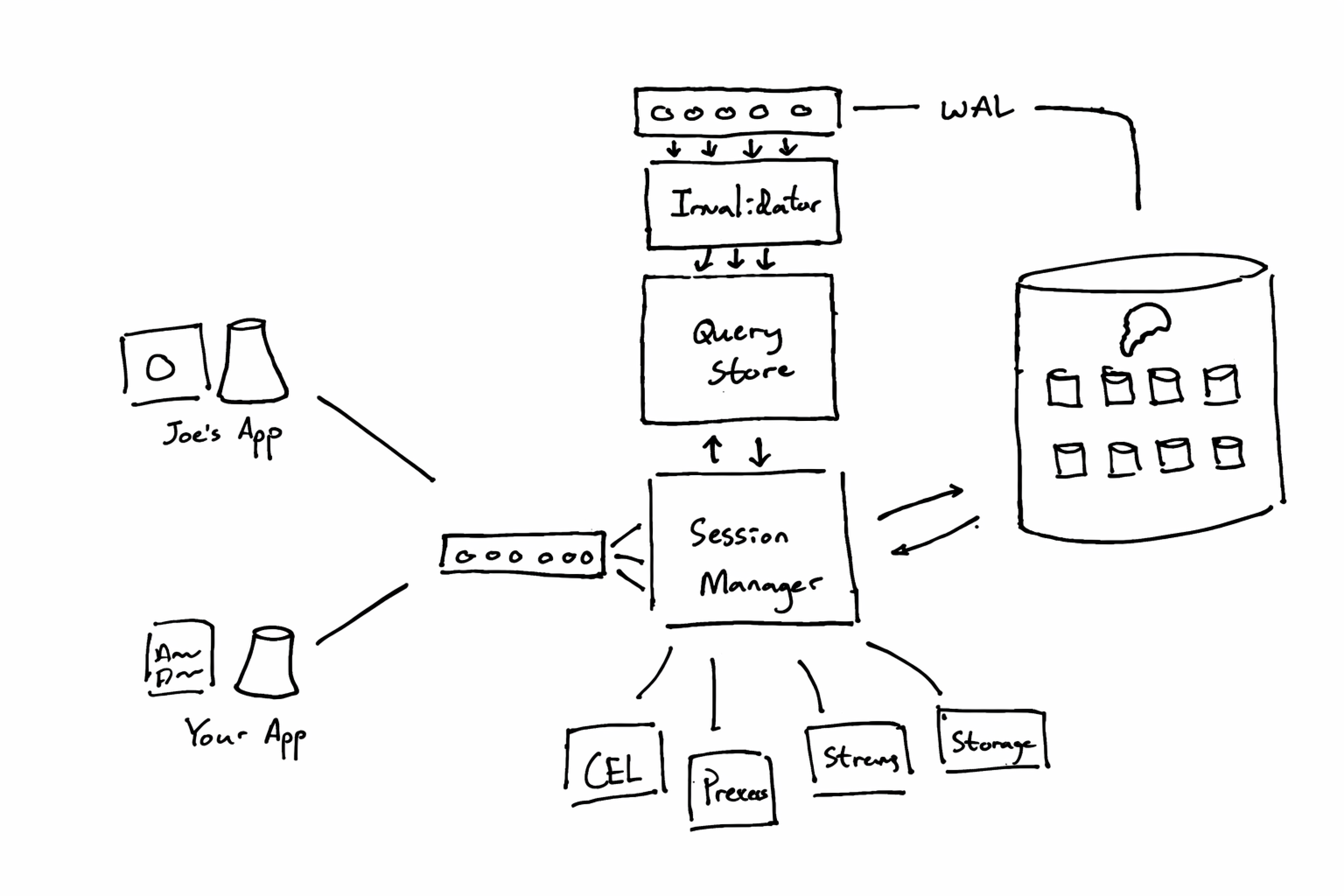
The design behind the backend is motivated by two constraints: we need to make queries reactive, and we need to be fair about multi-tenant resources.
Here’s roughly how the system looks:
Query Store
Let’s start by thinking through what happens when a user asks for a query.
First the server can go ahead and ask the database. In a stateless system that would be just about the end of the story. We could return our response and call it a day.
But remember, our queries have to be reactive. For that we need a place to store which users have made which queries. That’s what the Query Store is for:
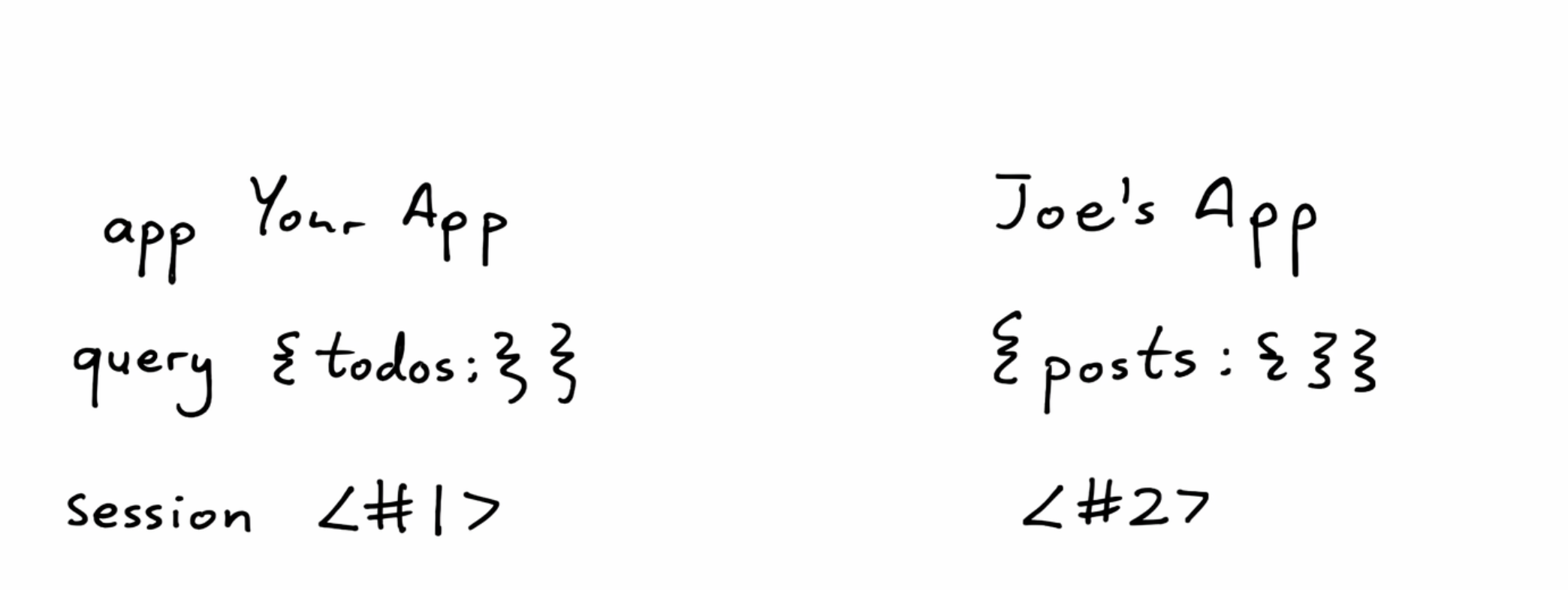
If we were to track just the queries and the socket connections that asked for them, in principle we would have what we need to make an app reactive. For example we could tail every transaction and refresh every query. That would work, but our database would get hammered with lots of spam.
Ideally, we should only change queries that need to be changed.
Topics
We scoured around for ideas, and found the architecture behind Asana’s Luna [10] and Figma's LiveGraph [11] very promising. Asana wrote about how they turn queries into sets of “topics”. Roughly, a topic describes the part of the index that the query in question cares about.
For something like “Give me all todos”, you could imagine a topic that says: “Track all updates to the TodosIndex”.
We adapted this idea into our system. When we run queries, we also generate a set of topics that it cares for:
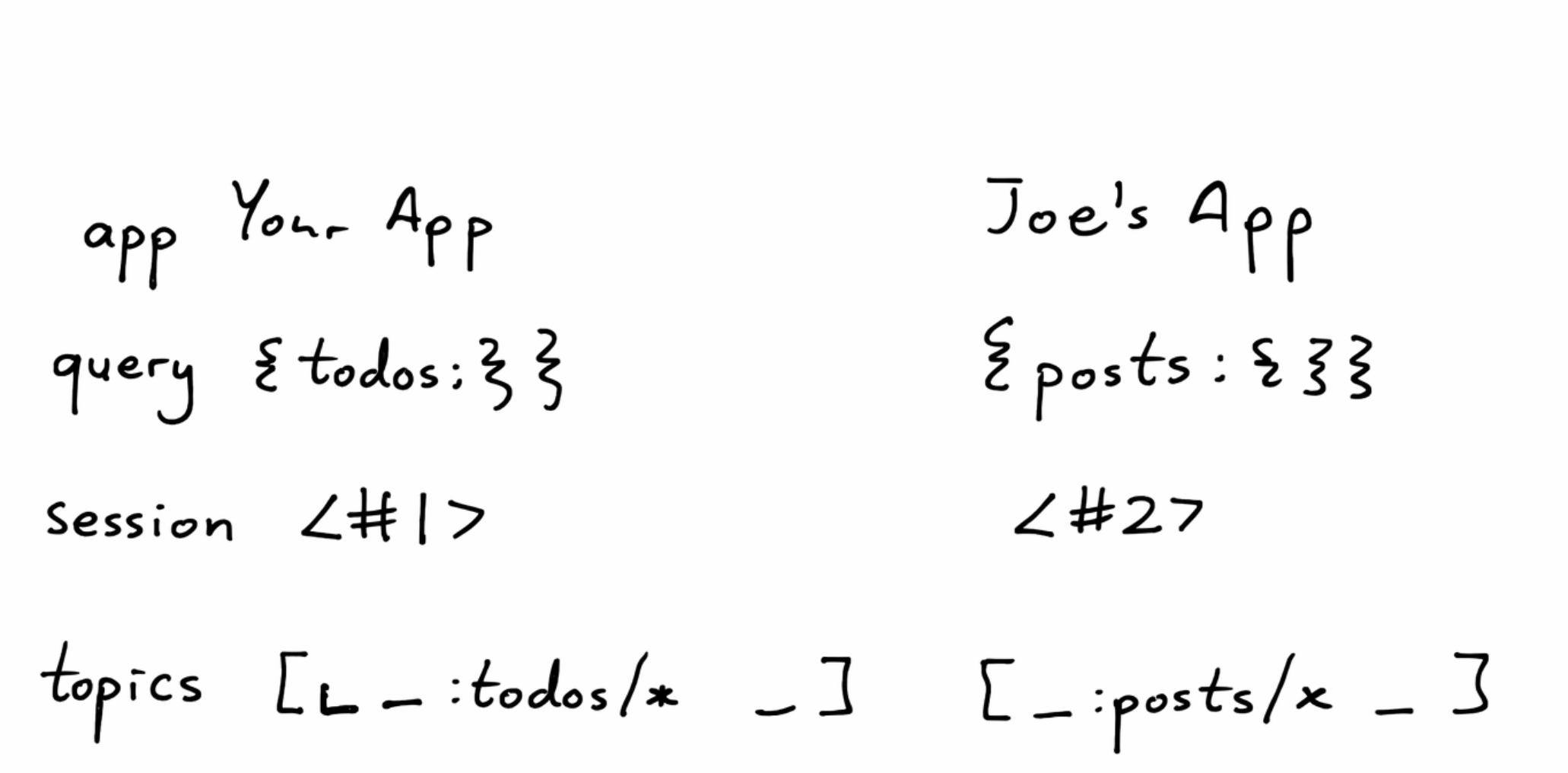
Here’s our topic for “Watch all todos”:
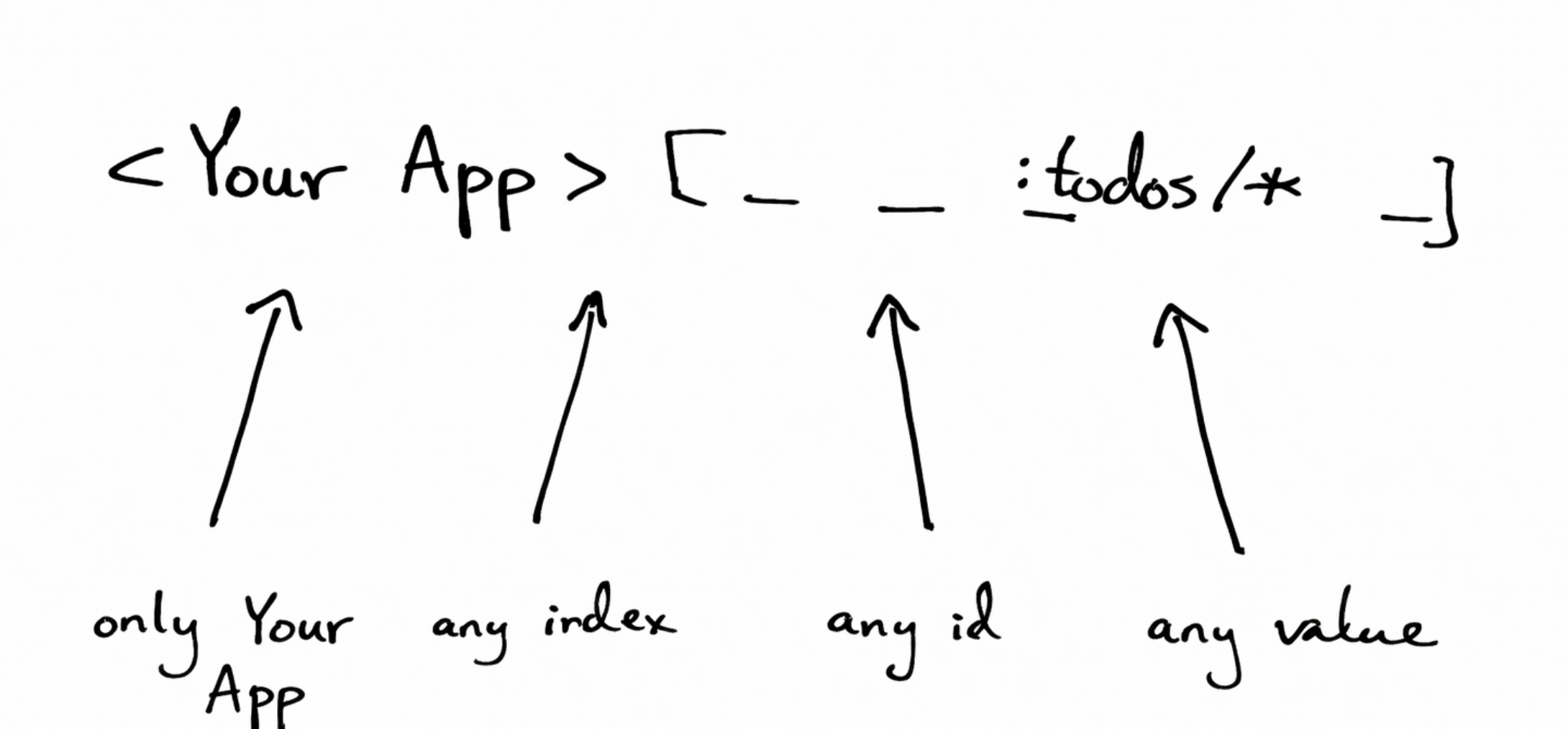
Now we have a data structure we can use to describe the dependencies for a query. The next step is to track transactions and find these affected queries.
Invalidator
That’s where the invalidator comes in. The invalidator tracks Postgres’ WAL (Write-Ahead Log).
We can take WAL entries and generate topics from them too. For example, if we had an update like “Set todo.done = false for id = 42’”, we could transform it:
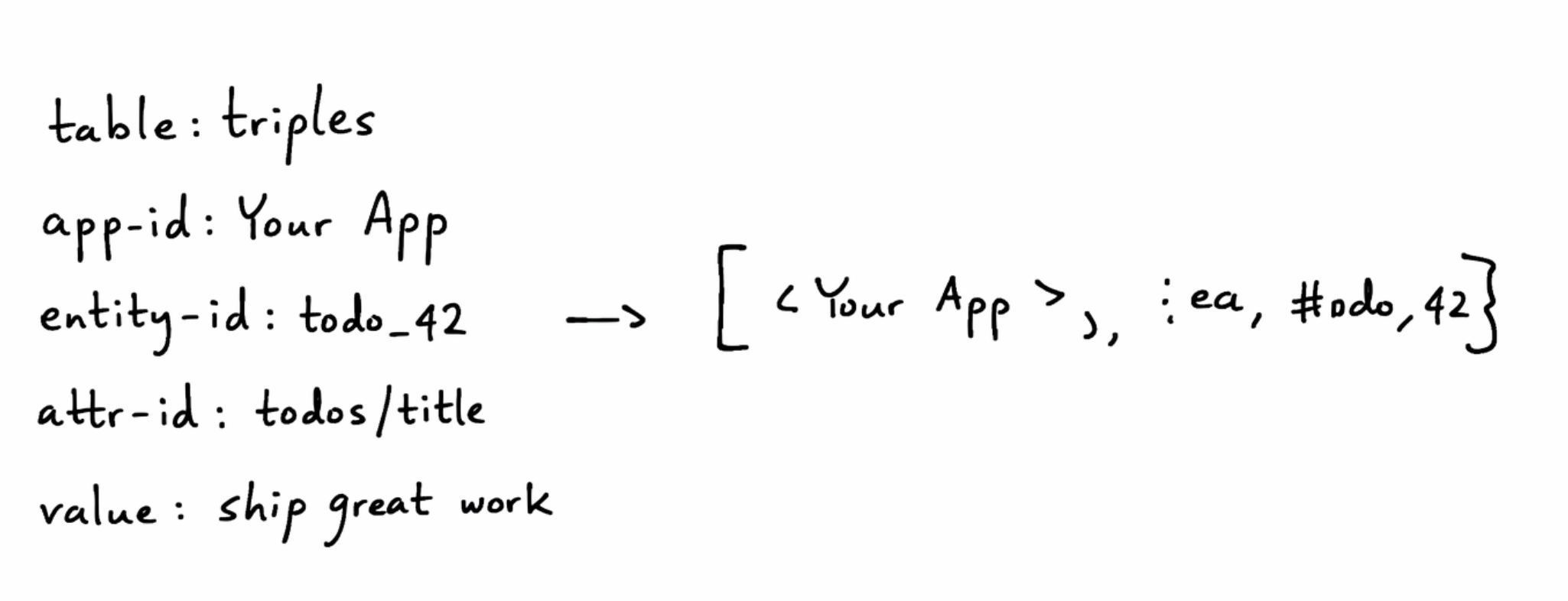
This gets us the exact same kind of topic structure that our queries make. Now we can match them together, and discover what’s stale:
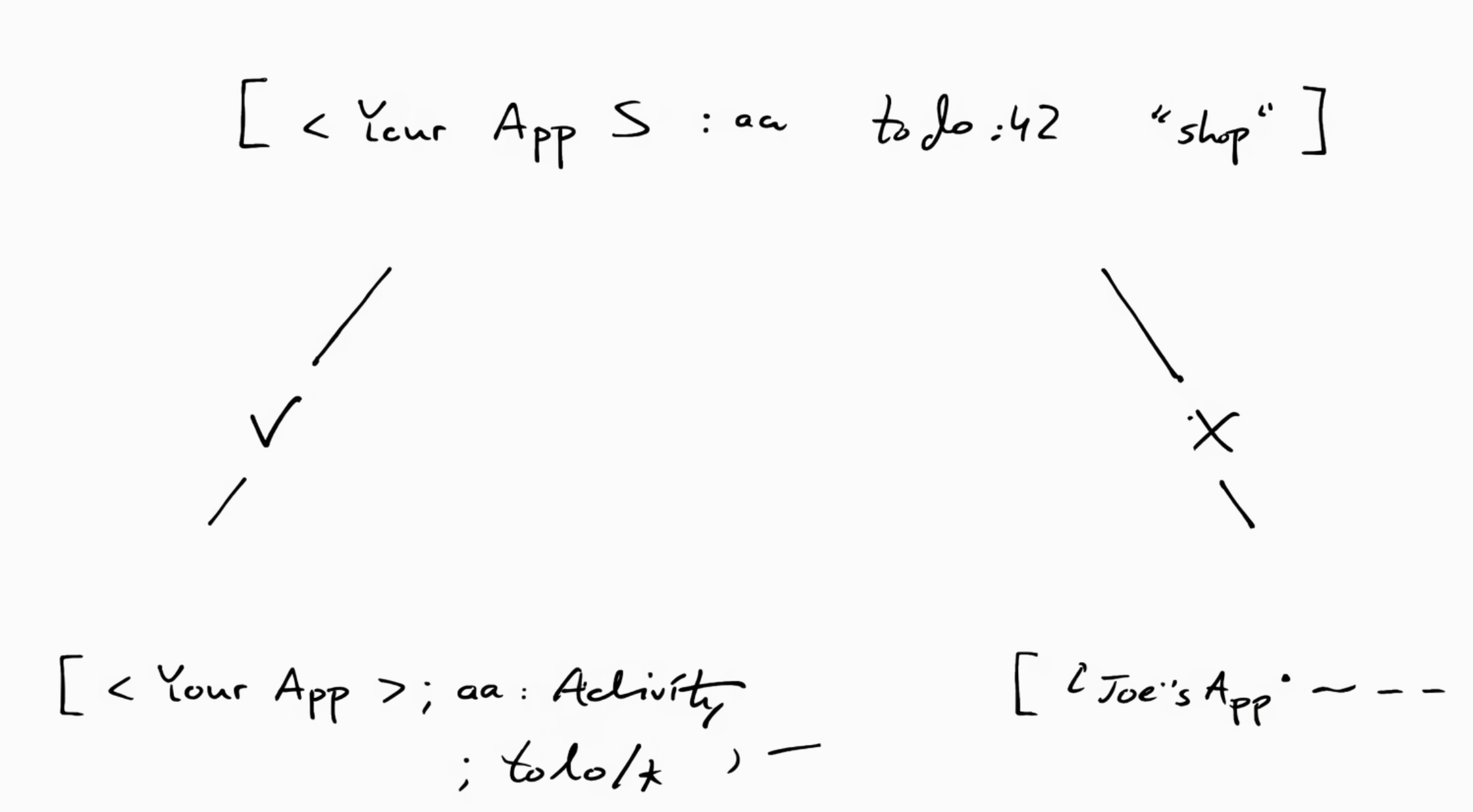
Our version zero for this algorithm was very inefficient. We would effectively do an N^2 comparison from every transaction topic to every query topic. But you can intuit how these topic vectors are amenable to indexes. We now keep them in a tree-like structure. We only compare subsets and we prune early. [12]
With that we can take a WAL entry and refresh queries based on them. The next step is to parallelize.
Grouped Queues
Since our database is multi-tenant, our WAL includes updates from multiple apps.
In order for the invalidation algorithm to work, transactions within a single app have to be processed serially and in order. But, we can certainly parallelize invalidations across different apps.
We needed some way to guarantee order within a single app and parallelize across apps. We also needed to make sure that one high-traffic app didn’t hog all resources.
This is where the Grouped Queue abstraction comes in:
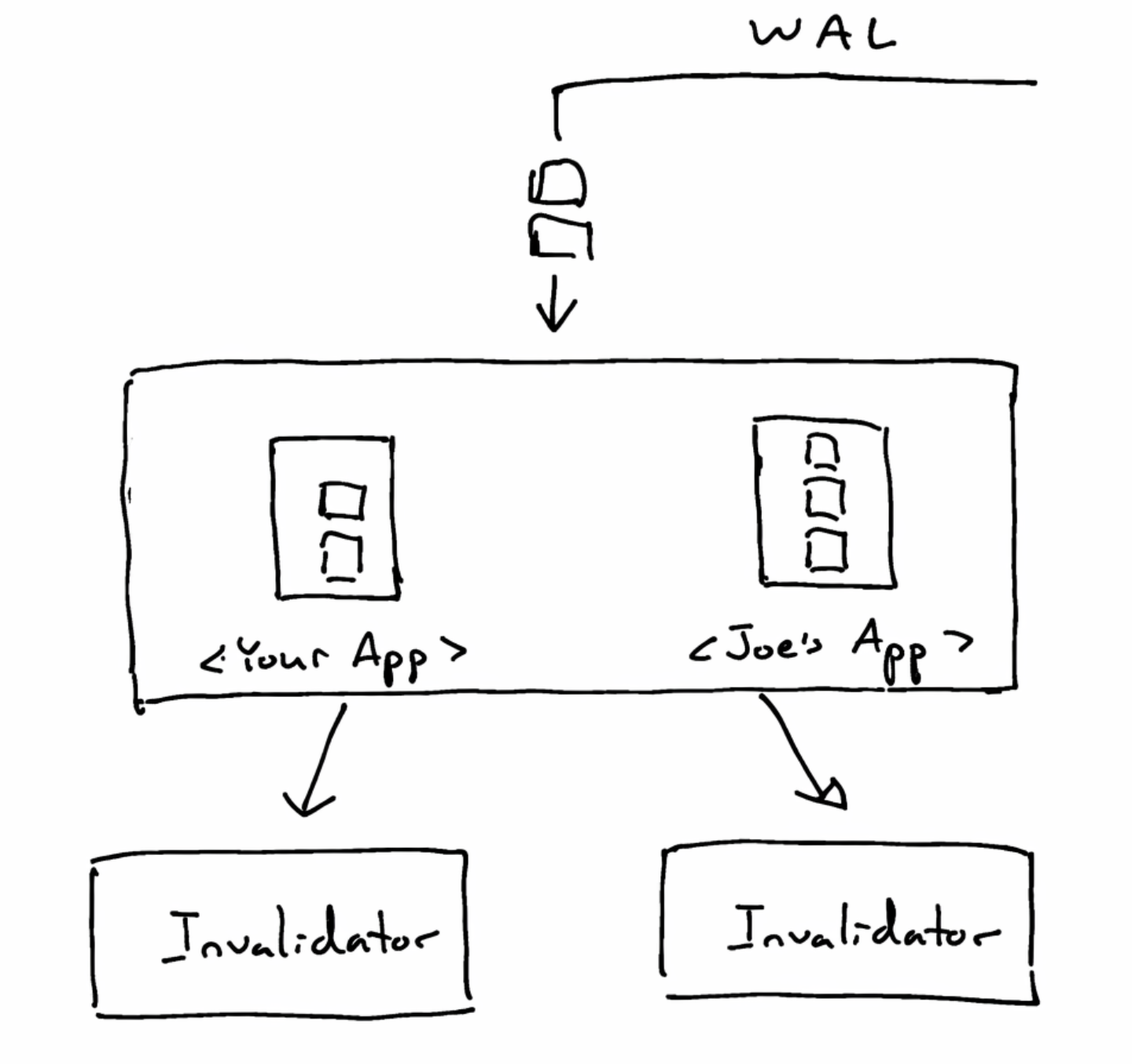
Each app gets its own subqueue. This guarantees that all items for a particular app are handled serially.
Workers however can take from multiple different subqueues. This lets us parallelize invalidations across apps.
When we push a WAL entry into the grouped queue, it gets added to the app’s subqueue, but the global order of the subqueue does not change. This makes it so even if one app is adding thousands of items per second, other apps still get an equal chance to get picked up by an invalidator.
This data structure has turned out to be very useful for us, and has seeped all across the code base, including the Session Manager.
The Session Manager, and Praise for Clojure and the JVM
Which brings us to the main coordinator inside the system. When the Client SDK opens up a websocket connection, it’s the session manager that picks up the messages:
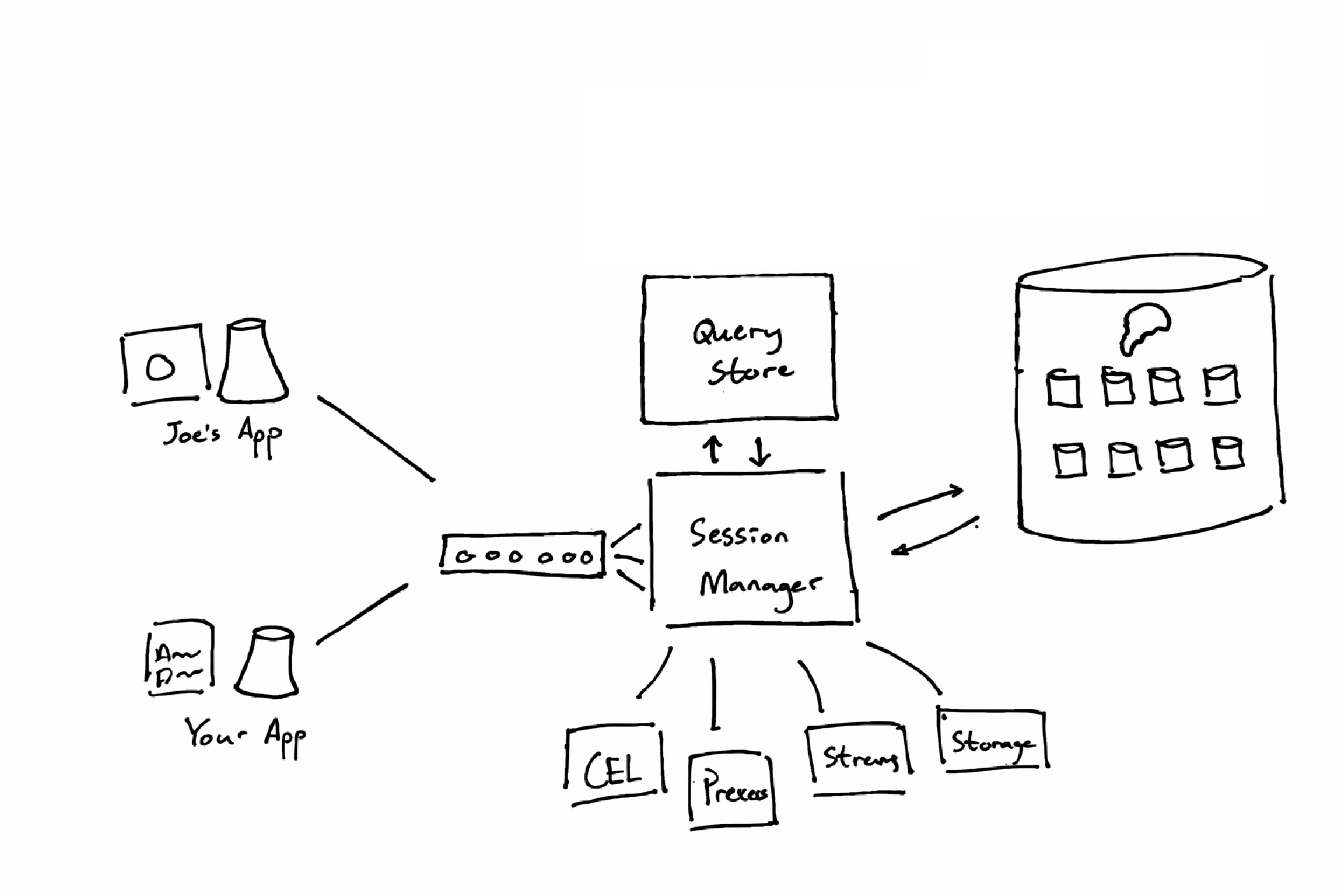
The Session Manager’s job is to glue everything together. It makes reactive queries, it runs permissions, and it passes along requests to the other services.
Notice the Grouped Queue abstraction makes an appearance here too. If different clients start bombarding the backend, the Grouped Queue makes sure to both parallelize as much as possible, and to prevent one bad socket from hogging all the resources.
And with this it may be the right place to pause and praise Clojure and the JVM. They’ve been a huge win for us in building this infrastructure.
First, Clojure comes with great concurrency primitives and has real threads. This lets us scale further with bigger machines and helped us avoid splitting the system up too early. The abstractions are also really simple and easy to compose. Our grouped queue for example is only 215 lines of code [13]
Second, the JVM has a thriving ecosystem and we really enjoy the libraries. For example, we needed a way for users to define permissions inside Instant. We wanted a language that would be fast and easy to sandbox. After some searching, we discovered Google’s CEL. Thankfully CEL Java was available, and we could just pick it off the shelf.
And third, Clojure is great for DSLs and for experimental programming. When we started building Instant we had to discover a lot of these abstractions, and playing with them in the REPL was instrumental.
Many folks deride DSLs but I think we couldn’t have built Instant without them. Case in point: multi-tenant queries. We needed to make our database multi-tenant. To do that we would need to write some pretty complex SQL. Rather than do this by hand, we made a DSL that both made it easy to reason about, and guaranteed that you could pass in an App ID.
And this brings us to the Multi-Tenant Database.
The Multi-Tenant Database
Our database was also motivated by two constraints: we needed a way to spin new databases cheaply, and we needed it to be relational.
Here’s where we ended up:
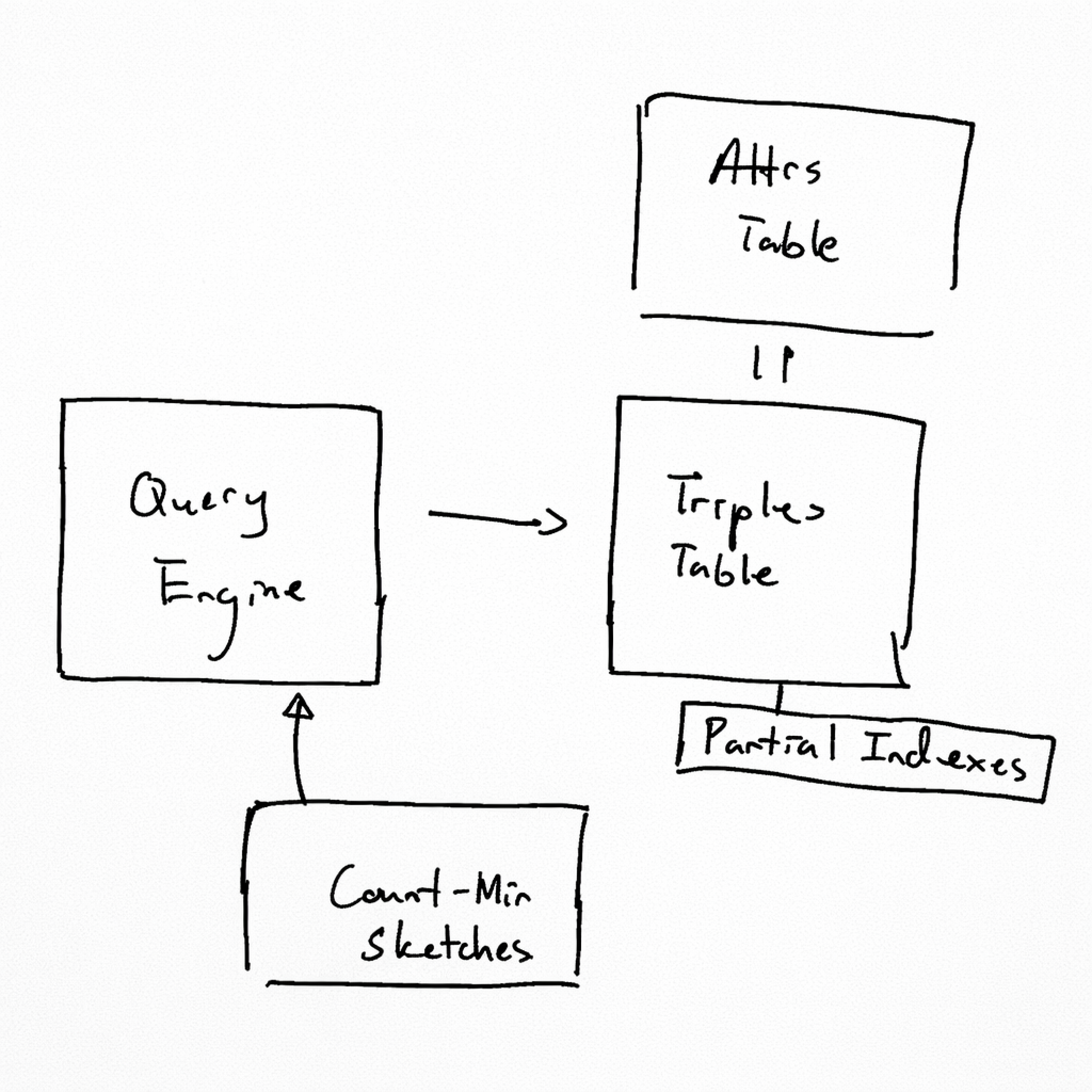
The Triples Table
Let’s start with the question: how can we let users create lots of different databases?
The most straight forward path would have been to spin up Postgres VMs. But as we mentioned, VMs come with lots of overhead in RAM. There’s no sustainable way to support unlimited apps if you’re spinning up VMs.
Another option would have been to use Postgres schemas. We could have created different tables for different apps, and then kept a mapping of who can see what. This would work, but Postgres wasn’t designed to scale well with tables. From our research we saw that after about 6000 tables, Postgres starts having issues: you get problems with how many files get created on disk, and pg_dump and autovacuum starts failing.
This makes sense. The average Postgres app has a few big tables, not many small tables, which means big tables get optimized. Well, if big tables work, what if we reframed this problem into a giant table?
And this brings us back to…Triple stores!
They worked well on the client because they’re a simple DB that supports relational queries. We thought this could work well for us in Postgres too. So we added a
triples table:View as:
TriplesShowing 4 of 12 rows
app_id
entity_id
attr_id
value
All the data lives in a single
triples table, and they’re logically isolated by an app_id.If we wanted to get
post_1 from the app blog for example, we could generate a SQL query that looks roughly like this:select *
from triples
where app_id = 'blog' and entity_id = 'post_1' and attr_id in (posts/id, posts/title)
With that, creating a new database is effectively free. Just as we mentioned in the demos, it’s a few rows in the database.
Surprising benefits
Our choice came with some surprising benefits too.
Since we manage columns ourselves, we were able to optimize the developer experience.
For example, Postgres locks the table when you create a column. Since we implemented columns ourselves, we could make them lock-free.
When you delete a column in Postgres, the data is gone. But we thought this was way too dangerous in the world of agents. So we implemented soft deletes at the column level. Even if a rogue agent deletes your columns, you can undo it and get all your data back in milliseconds.
These were the benefits, but of course there were costs too.
Partial Indexes
Consider a user who says, “I want my posts to have a unique ‘slug’”. In Postgres it’s easy to create unique columns. But since we’re implementing our own columns, we have to do this ourselves.
This is where partial indexes came to the rescue. We could add boolean markers to our
triples table:table_name: triples
app_id | entity_id | attr_id | value | column_unique | ...
Once we have that, we can create a partial index for the whole table, flipped on by the marker:
create unique index unique_columns
  on triples(app_id, column, value) where column_unique
Now if a user tries to insert two posts with the same slug:
app_id  | object_id | column | value   | column_unique
'blog' | 1         | 'slug' | 'hello' | true
'blog' | 2         | 'slug' | 'hello' | true
The
unique_columns index triggers and prevents it!And this same trick makes our queries more efficient. If we want to find posts with the slug ‘hello’ for example, we can generate this query:
select entity_id
from triples
where app_id = 'blog' and attr_id = 'slug' and value = 'hello' and column_unique;
And we can extend this pattern to a whole range of queries: unique columns, indexes, dates, references, and so on.
Just using partial indexes and relying on Postgres to make the right queries worked great for us for a while. But after we reached a few hundred million tuples in scale, Postgres started having troubles.
Count-Min Sketches
If you are a Postgres expert reading this, you may have taken a pause looking at that triples table. In Postgres circles this is called the EAV pattern, and is generally discouraged.
It’s discouraged because Postgres relies on tables and columns for statistics.
Those statistics are what let the query planner decide which indexes are most efficient and which joins to do in what order.
Once you keep all data in one table, Postgres loses information about the underlying frequencies in the dataset. It can't tell the difference between a column with 10 distinct values and one with 10 million.
To solve for this, we started keeping track of our statistics. We use a data structure called count-min sketches, which help us estimate frequencies for columns. If you’re curious about how that works, we wrote an essay about it [14].
We could give those statistics to our query engine, and make those queries efficient again.
The Query Engine
Which brings us to the query engine.
So far I’ve been showing you SQL queries that are simple and easy to understand. But imagine translating more complicated InstaQL queries. Even a query with one where clause will start to have CTEs in them. And then you’ll want to use those statistics to decide which indexes to turn on.
That’s what the query engine does. It takes InstaQL queries as well as the count-min sketches, and generates SQL query plans:
InstaQL
{ todos: { $: { where: { done: } } } }
 Postgres
WITH done_triples AS ( SELECT entity_id FROM triples WHERE app_id = 'instalinear' AND ave AND attr_id = 'todo-done' AND value = ), todo_data AS ( SELECT t.entity_id, t.attr_id, t.value FROM triples t JOIN done_triples d ON t.entity_id = d.entity_id WHERE t.app_id = 'instalinear' ) SELECT * FROM todo_data
This engine is written in the Clojure backend. We took a lot of inspiration from Postgres’ own query engine. Sometimes these queries can look scarily long, but we have been so darn surprised with how well Postgres can handle them. We pass in some hints with pg_hint_plan, and Postgres just churns away and produces results.
Four Years in the Making
And that covers the database, which covers our whole system!
We hope you found this fun! This has been a labor of love. We’ve built Instant because we want to power the next generation of builders. Any product we build, we built with Instant, and thousands of developers have trusted to run their core infrastructure.
If you're building with agents, I think you will love using us.
Footnotes
-
LLMs have already learned about Instant in their training data, but there really isn’t that much to learn. Queries and transactions have a predictable DSL. ↩
-
Fun fact, your files are still stored in S3. Since both services are built together though, the system can handle bi-directional data sync on your behalf! ↩
-
On React Native we use react-native-async-storage, because it's available on Expo Go. The API for storage is pluggable though, so you can replace this pretty easily. ↩
-
Check out Datalog in Javascript ↩
-
There would be a lot more problems too. Check out the sync engine page, especially the conflict resolution demo. ↩
-
https://mutative.js.org/ -- it's a great library! ↩
-
This came very handy in our Explorer page. You can switch around a bunch of filters, and we'll dynamically generate the query for it. ↩
-
We do some even more cool things. For example we take where clauses and transform them into little programs for additional filtering. ↩
-
Check out Count-Min Sketches in JS ↩